 English
 Русский
 العربية
 中文
 Français
 Deutsch
 Italiano
 한국어
 Português
 Español
 Nederlands
Virtual Card for ChatGPT: What to Check Before You Pay (2026)
Quick answer: a virtual card for ChatGPT is a card number you use only for online payments, with its own balance, so you can pay for ChatGPT Plus without using your bank card. It helps most when your own card keeps getting declined, but no card is guaranteed to be accepted.
🔍 When a virtual card for ChatGPT makes sense
People usually look for one in these cases:
- your bank declines ChatGPT or other foreign online payments
- your country or bank type is not accepted by the payment form
- you want a separate balance so a subscription cannot spend more than you loaded
- you prefer not to give your main card number to an online service
If the payment fails for another reason, such as a wrong billing address or unfinished 3D Secure, start with our guide to why a ChatGPT card is declined.
✅ How it works in practice
Create an account with your email
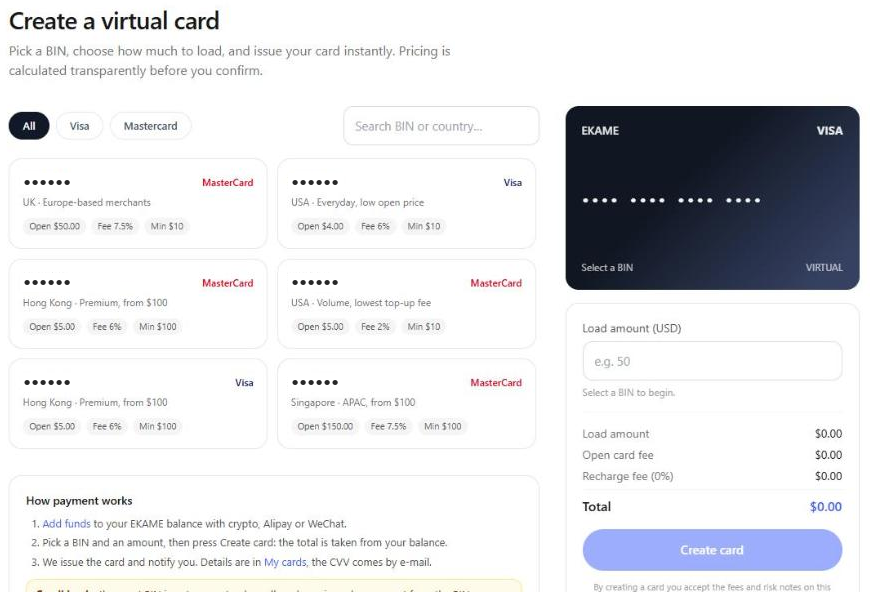
Add balance and create a virtual Visa or Mastercard
Enter the card in ChatGPT with the billing address shown in your account
Three steps. Use the billing address from your account, not your home address.
📋 What to check before you pay
- Enough balance. Load the price of the plan plus a small margin, because a payment fails if the balance is short.
- 3D Secure. The card supports it, so approve the code quickly when ChatGPT asks.
- Renewal. ChatGPT Plus renews every month. Keep the balance topped up before the renewal date, or the next charge will be declined. If you want to stop it, see how to cancel ChatGPT Plus.
- Card type. A reloadable card suits a monthly plan. A card meant for one payment will not work for renewals. Check which type you pick on the card page.
📊 What we see in our own card statements
We looked at attempts to pay OpenAI and ChatGPT with Ekame cards since August. It is a small sample (15 cards, about 30 declined attempts), so read it as an illustration, not as a statistic for every card.
- More than half of the declines came with no reason at all. The card statement just says “declined”.
- About one in five pointed to the postal code, which means the billing address did not match.
- About one in five hit a spending limit on the card.
- One was a balance or online-purchase limit problem.
The practical lesson: type the billing address and postal code exactly as shown in your account, and check the card limit and balance before you try again.
⚠️ Honest warning
ChatGPT can decline any card, virtual cards included, and we cannot promise it will accept yours. Do not retry the form many times in a row. A card is a payment tool, not a piggy bank, so load only what you need. Fees and limits depend on the card you choose, so read them on the card page before you pay.
New to virtual cards? Start with how to use a virtual Visa card, or see the general guide to virtual cards for online purchases. Ready to try: ekame.net.
❓ FAQ
Can I pay for ChatGPT Plus with a virtual card?
Often yes, but it is not guaranteed. ChatGPT decides whether to accept a card, so a virtual card can fix a problem with your own card without being a sure fix.
Will a virtual card renew my ChatGPT subscription automatically?
Only if the card is still active and has enough balance on the renewal date. Top it up in time.
Which billing address should I use?
The one shown in your account for that card, not your home address.
What if the payment is still declined?
Do not keep retrying. Check the balance and 3D Secure, wait a while, then try once more or contact support.